
Missable items get priority over everything else, since they expire while persistent items wait. A companion app such as Droidex Companion can carry the checklist and verification load for you once you have the structure in place.
TL;DR:
- Prioritize completing missable items tied to seasons, events, or unique quests before working on persistent collectibles, as missed opportunities often cannot be recovered.
- Use a checklist that categorizes items accurately, matches in-game labels and locations, and flags expiry dates to prevent confusion and missed targets.
- Confirm progress through in-game completion percentages by checking category totals rather than relying solely on tracker summaries to identify discrepancies quickly.
- Choose trackers with features like filtering uncollected items, attaching notes, saving across devices, and supporting screenshots for effective long-term collection management.
- Plan collection routes by grouping items from the same map area, filtering only uncollected items, and recording counts before and after each cluster to avoid backtracking and RNG delays.
Table of Contents
- How to build a 100% checklist that matches the game
- Choosing and using trackers and interactive maps
- Handling missables and event-tied items: what to do first
- Execution tactics: routes, batching, and verification shortcuts
- Lessons from building a Droid Tycoon tracker
- Droidex Companion: use the checklist and map workflow with this app
- FAQ
- Sources
How to build a 100% checklist that matches the game
A checklist only works when it mirrors the categories the game itself uses to calculate completion. Games typically split their total into subtotals, such as items, upgrades, scans, and challenges, and treat each as a separate counter on the completion screen. When your spreadsheet or tracker lumps everything into one running number, you lose the ability to spot which category is actually missing pieces. IGN's completion guide for Metroid Prime 4: Beyond separates totals like Missile Expansions and Logbook scans precisely because the game's own counter tracks them independently, and matching that structure prevents confusion about what still counts toward 100%.
Build each checklist row with the same fields, regardless of the game:
- Item name or ID, matched exactly to the in-game label
- Map location or zone, specific enough to navigate back to it
- Category (collectible type, upgrade, scan, challenge)
- Missable flag (yes or no, with the expiry condition noted)
- Verification method (visual confirmation, counter check, inventory scan)
- Notes field for spawn conditions, prerequisites, or screenshots
Once the fields exist, read the game's own completion screen before you trust your spreadsheet. If the in-game percentage disagrees with your count, the category subtotals typically reveal the discrepancy faster than rechecking the full list.
Choosing and using trackers and interactive maps
A tracker or map is only useful if it persists long enough to matter. Before committing hours of farming to any tool, confirm it saves progress the way you need it to. Piggyback's game maps advertise features such as progress tracking, custom markers, and screenshots; these are baseline features worth checking for in any map provider you choose.
Look for these capabilities before adopting a tracker:
- Filters that isolate uncollected items from the full map
- Custom notes attached to individual markers
- Unlimited markers, not a capped number per session
- Screenshot support for visual confirmation later
- Cross-device saving, so progress survives a reinstall or platform switch
Account-saved trackers persist across devices but require sign-in and sometimes a subscription, similar to how the Retro Pulse handheld gaming console offers an offline-first experience with extensive offline storage capabilities. Local-only trackers work offline but vanish if you clear browser data or switch computers. Test which category a tool falls into before you rely on it for a long collection.
Pro Tip: Open the map, filter to uncollected items only, plan your route, confirm each item in-game, then mark it complete. Doing the steps in that order avoids both backtracking and false completions.
Handling missables and event-tied items: what to do first
Missable items are anything tied to a limited window: a seasonal event, a one-time quest branch, or a spawn that disappears after a story trigger. Fortnite's official seasonal guidance lists specific tokens and Snap Styles that disappear once a season ends, which is the clearest example of why missables need their own priority tier instead of sitting in a general backlog.
Work through missables in this order:
- Flag every item tied to an event, season, or one-time quest in your checklist's missable column.
- Resolve anything with a known expiry date before touching persistent collectibles that will still be there next week.
- Save your game before a risky step that could lock you out of a reward, and take a screenshot of your current count beforehand.
- Log the timestamp of any event window so you know how much time remains before it closes.
Persistent items reward patience. Missables reward speed, so sequence your sessions accordingly.
Execution tactics: routes, batching, and verification shortcuts
Backtracking wastes more time in a long collection than almost any other mistake. Group items by map cluster first, then layer in spawn timing if the collection involves randomized encounters. Clearing a cluster in one pass, rather than circling back for one or two missed items, keeps playtime proportional to actual progress.
- Filter your map to uncollected items only before starting a route
- Drop a temporary marker on anything with a spawn window so you remember to return
- Screenshot your counter before and after a cluster to confirm the gain matches what you expected
- Treat save states as checkpoints you can return to if a count doesn't match
Pro Tip: When rebirth mechanics reset progress, record your pre-rebirth and post-rebirth counts separately. A mismatch after rebirth is easier to diagnose when you have both numbers side by side.
If your farming route relies on RNG spawns, batch by location first and let timing sort itself out within each cluster rather than chasing a single rare spawn across the map.
Lessons from building a Droid Tycoon tracker

Designing a tracker for Droid Tycoon taught a straightforward lesson: visual confirmation beats assumption every time. Local screen recognition reads what's actually on screen rather than guessing from a logged action, which matters once a collection grows past a few dozen entries and small discrepancies start compounding.
Subtotals caught problems that a single running total missed entirely. An item that looked collected in one category sometimes hadn't registered in the game's own counter, and only a persistent overlay checking both numbers side by side exposed the gap before it turned into hours of wasted backtracking. That pattern holds for any large collection, not just Droid Tycoon's.
— Daniel
Droidex Companion: use the checklist and map workflow with this app
The workflow in this guide, a checklist built around real categories, a map with persistent notes, and verification before you mark anything done, is exactly what Droidex Companion is built to carry for Droid Tycoon players.
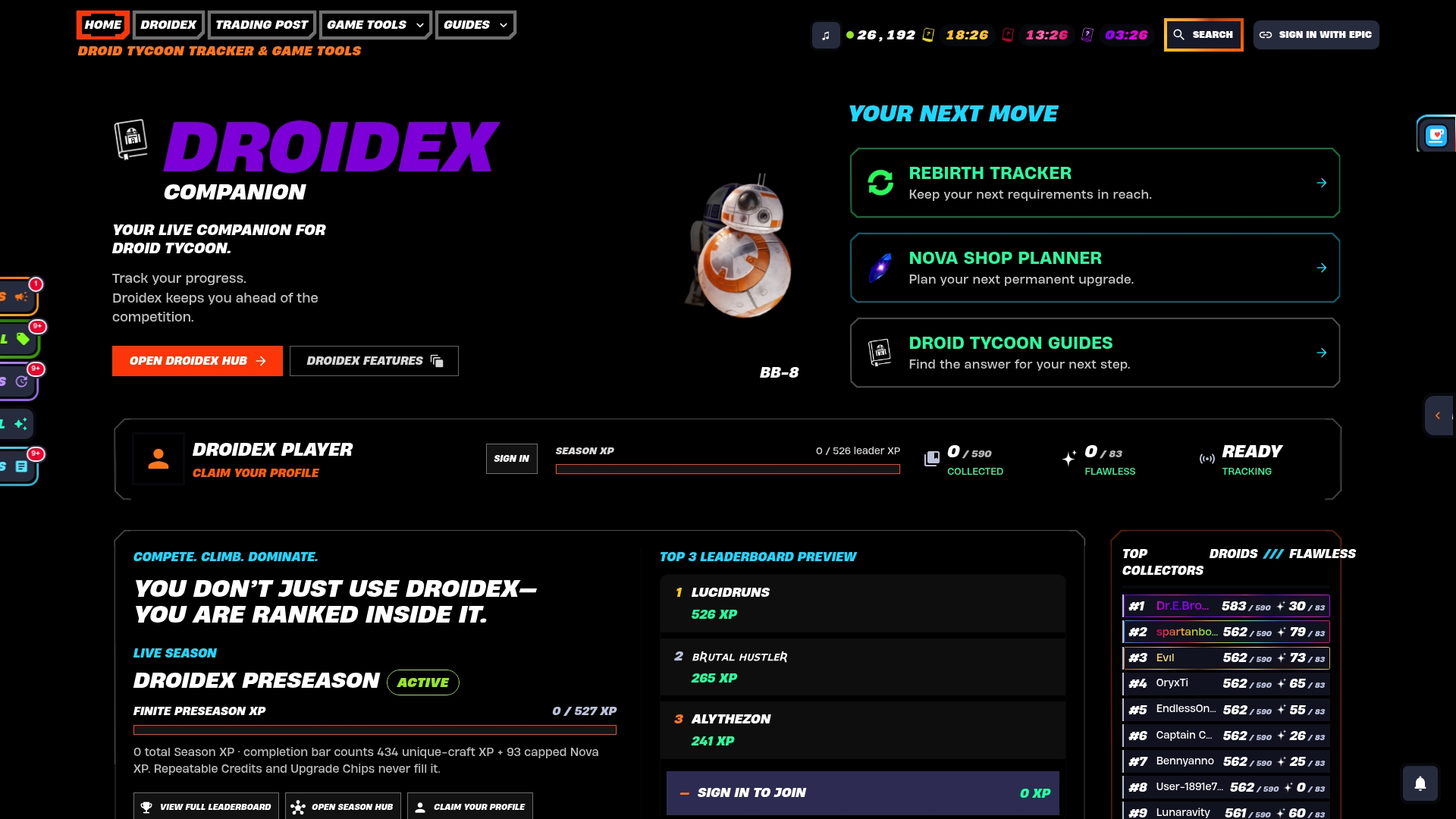
- Live stat tracking confirms progress in real time using local screen recognition, so you're checking the actual game state rather than a guess
- Collection management keeps category subtotals separate, mirroring the checklist structure this guide recommends
- Rebirth planning records pre- and post-rebirth states automatically, which removes the manual logging step from your routine
- Customizable overlays let you keep verification data visible without switching windows mid-session
Download Droidex Companion and run your next collection pass with the checklist already built in.
FAQ
How do I know if an item is missable?
Check the game's official event or seasonal pages, since those confirm which rewards disappear after a window closes. Fortnite's season-end guidance is a clear example of how official sources spell out expiry conditions that a wiki might miss.
Should I trust a tracker's saved progress completely?
No. Treat any tracker as a memory aid, not a final record, and confirm each item in-game before marking it complete. Coverage and persistence vary by tool, as Lifehacker's tracker comparison notes, so verification stays the deciding step regardless of which tool you use.
What's the fastest way to avoid backtracking?
Batch items by map cluster before you start a route, then filter your tracker to show only uncollected items. Interactive maps with custom markers and screenshot support, like those from Piggyback, make it easier to plan a single efficient pass instead of several partial ones.
Does Droidex Companion cost anything to use?
Droidex Companion's core features are free to use, with optional donations available through Ko-fi for players who want to support development. Pricing details and the current feature set are listed on the Droidex Companion page.
What should I do if my checklist disagrees with the game's completion percentage?
Check your category subtotals rather than the single running total, since a mismatch usually hides in one specific category. IGN's completion guide approach of tracking by category rather than one combined number makes this kind of discrepancy much easier to isolate.
Sources
For map-based tracking, Piggyback's interactive maps list progress tracking and custom markers worth checking against your own tool. For tool comparisons, Lifehacker's roundup of collectible trackers covers persistence and account requirements across several options. For missable deadlines, consult each game's own official event pages before planning a long farming session.
- Official Game Maps
- 100% Completion Guide - Metroid Prime 4: Beyond Guide - IGN
- I Use These Sites to Track All the Collectibles in My Games | Lifehacker
- What To Finish Before The End of Fortnite Chapter 3 Season 3