
Install Droidex Companion, enable its overlay widgets, and switch Fortnite's rendering mode to Performance with TSR or NVIDIA DLSS turned on to keep frame rates stable. Grant the app screen permissions, position your Credits, Credits-per-second, and Rebirth widgets, then confirm everything reads correctly in a short Creative test run. Many players can set up live stat tracking quickly.
TL;DR:
- Setting Fortnite to Performance rendering mode and enabling upscalers like DLSS or TSR reduces GPU load and prevents overlay-related stutters.
- Proper placement of Droidex Companion widgets and saving presets tailored to different tasks improves real-time tracking without cluttering the screen.
- Using OBS with Game Capture avoids overlay disruption and separating Fortnite's built-in display from Droidex Widgets ensures accurate recording and streaming.
- Running overlay software that relies on local screen recognition minimizes security risks, but keep permissions and app updates regularly checked.
- Starting each session with a five-minute conveyor sweep and rebirth checklist provides better timing and decision-making for upgrades and blueprints.
Table of Contents
- What you need before setting up a Droid Tycoon overlay
- How to install and configure the Droidex Companion overlay
- Adding overlays to OBS without breaking the Fortnite HUD
- Fixing FPS drops and overlay conflicts
- Overlay presets for rebirth timing and blueprint buying
- Keeping overlay use safe and private
- A five-minute overlay routine that keeps sessions on track
- Droidex Companion: what it offers and where to get it
- Where to check settings and updates
- Sources
- FAQ
What you need before setting up a Droid Tycoon overlay
A stable overlay setup starts with the machine and the game settings, not the overlay app itself. Overlays run alongside Fortnite's renderer, so any headroom you save on the game side goes straight to overlay stability.
Check these baseline items first:
- Run Windows with the game installed on an SSD, since Epic Games notes that an SSD or at least 6 GB of RAM reduces hitching on older machines.
- Update your GPU drivers before installing any overlay software.
- Set Fortnite to fullscreen rather than windowed or borderless.
- Set Rendering Mode to Performance in Video settings if your hardware is mid-range or older.
- Turn on RECORD REPLAYS only if you plan to capture footage for review later.
At least 6 GB of RAM paired with an SSD is the minimum system baseline Epic Games points to for reducing frame hitches, which matters once an overlay is drawing on top of the game.
Enabling an upscaler such as TSR or NVIDIA DLSS at this stage matters too. It renders the game at a lower internal resolution and upscales the output, which frees GPU cycles that the overlay process can use instead.
How to install and configure the Droidex Companion overlay
Setting up Droidex Companion for Droid Tycoon follows a fixed sequence. Skipping the permission step is the most common reason widgets show a blank screen later.
- Download the installer from the official Droidex site and run it with administrator rights if Windows prompts for elevated access.
- Verify the install completed correctly on the app's verification page before opening Fortnite.
- Launch Droidex Companion and grant screen-access or overlay permissions when Windows asks.
- Enable the overlay module from the app's settings menu.
- Add core widgets: Credits, Credits per second, active droid slots, and the rebirth checklist.
- Set an update frequency and assign hotkeys for toggling widgets mid-match.
- Position each widget where it won't block the minimap or conveyor prices, then save the layout as a preset.
Droidex Companion uses local screen recognition rather than reading memory or network traffic, so widgets update from what's visible on screen. That's also why widget placement matters: a widget covered by another HUD element won't read correctly.
Save at least three presets once the widgets are placed: an income-first layout, a rebirth-planner layout, and a blueprint-scout layout. Switching between them with a hotkey beats rebuilding a layout mid-session.
Pro Tip: Name your presets after the task, not the droid tier, so you can swap layouts without pausing to remember what each one shows.
Adding overlays to OBS without breaking the Fortnite HUD
Streaming or recording Droid Tycoon sessions adds a second layer of settings on top of the overlay itself. Getting capture mode wrong is usually why an overlay shows in-game but disappears in the recording.
- Use OBS Game Capture as the default source, since it has the lowest performance cost for full-screen Fortnite.
- Switch to Window Capture only when the overlay runs as its own floating window separate from Fortnite.
- Keep two distinct overlay layers: Fortnite's built-in display for FPS and ping, and Droidex Companion for Credits, rebirth progress, and droid slots. Mixing the two makes it harder to tell a rendering issue from a tracking issue.
- Assign a hotkey or scene transition to hide overlays quickly when you want a clean screenshot or replay.
- If you're capturing a replay without HUD elements, set RECORD REPLAYS to on and HUD INFO TYPE to NONE in the My Island UI settings, since that setting is separate from your regular in-match HUD.
Partner tools built for overlay legibility, such as Fortnite phone wallpapers from Wallpics, can also help you test contrast and spacing before locking in a layout you'll stream regularly.
Fixing FPS drops and overlay conflicts
Overlay-related stutters almost always trace back to one of three causes: rendering mode, missing upscaler support, or refresh rate set too aggressively.
- Switch Rendering Mode to Performance and fully restart Fortnite, since Epic Games confirms this reduces rendering overhead rather than just lowering visual quality.
- Turn on TSR or NVIDIA DLSS under Video, then Anti-Aliasing and Super Resolution, and test the Quality, Balanced, and Performance presets to find the smoothest one for your GPU, following Epic's own troubleshooting steps.
- Drop the overlay's refresh interval from every second to every 3 to 5 seconds if you're seeing stutter tied to widget updates, since Credits-per-second and rebirth checks don't need instant refreshes to stay useful.
- Run the overlay as a background process and confirm the capture app has administrator rights, which prevents permission conflicts that cause dropped frames.
A rendering mode switch plus an upscaler frees the GPU headroom that Epic's low-FPS guidance is built around, and that headroom is exactly what an overlay process draws from.
Overlay presets for rebirth timing and blueprint buying
Different in-session goals call for different widget combinations. Building presets around the task, rather than trying to show everything at once, keeps the screen readable during fast decisions.
- Income-first preset: Credits, Credits per second, and the production rate of your top droid slot, useful for stretches where you're just farming.
- Rebirth-planner preset: an active droid checklist, a Credits target, and a rebirth progress widget, since Super Rebirth payout scales with how the active droid requirements are met.
- Blueprint-scout preset: Credits-per-second next to the conveyor price display, so you can compare what a blueprint costs against what your current droids are earning.
During a conveyor sweep, watch Credits-per-second against the listed price before buying. Community guides point out that swapping droids and watching the conveyor is one of the more reliable ways to keep credit flow climbing, and having that number on screen removes the guesswork. Sell low-value blueprints as soon as a higher-tier droid outproduces them, and hold off on triggering Super Rebirth until the checklist widget shows every active droid requirement met.
Pro Tip: Keep the rebirth checklist near the minimap rather than centered on screen, so it stays visible during a conveyor sweep without covering the prices you're comparing.
Keeping overlay use safe and private
Third-party overlays read what's displayed on screen, so it matters how that data is handled. Droidex Companion works through local screen recognition, meaning it reads visible game data on your machine rather than pulling from Epic's servers or your account credentials.

Before installing any overlay tool, confirm the source is the developer's own site rather than a third-party mirror, since repackaged installers are a common way unwanted software gets bundled in. Check the app's verification page if one is available, and avoid granting permissions beyond screen capture and overlay display. An overlay tool has no legitimate reason to request access to your Epic account password or payment details.
Keep the overlay app updated, since a Droid Tycoon patch that changes UI layout or droid icons can cause a screen-recognition overlay to misread values until the app itself is updated to match. Review what permissions Windows has granted the app periodically, particularly after major Windows updates that sometimes reset app permissions.
Running overlay software alongside Fortnite doesn't violate anything about your account since it doesn't modify game files or read memory directly, but it's still worth sticking to tools that are transparent about their method, as screen recognition is, rather than tools that are vague about how they gather data.
A five-minute overlay routine that keeps sessions on track

Every session starts the same way. Set Fortnite to fullscreen, apply the Performance rendering preset, and open Droidex Companion before loading into the match. Check the rebirth checklist widget first, since that tells you within seconds whether this session is a farming stretch or a rebirth-prep stretch.
A five-minute conveyor sweep at the start of each session catches blueprints worth buying before they rotate out. Watch Credits-per-second against the conveyor price, not just the price alone, since a cheap blueprint that underproduces isn't worth the credits.
— Daniel
Droidex Companion: what it offers and where to get it
Droidex Companion turns the guesswork out of Droid Tycoon sessions by tracking live stats directly from your screen, without needing account access or manual logging. That local screen recognition approach is what separates it from overlay tools that require external logins or memory reading.
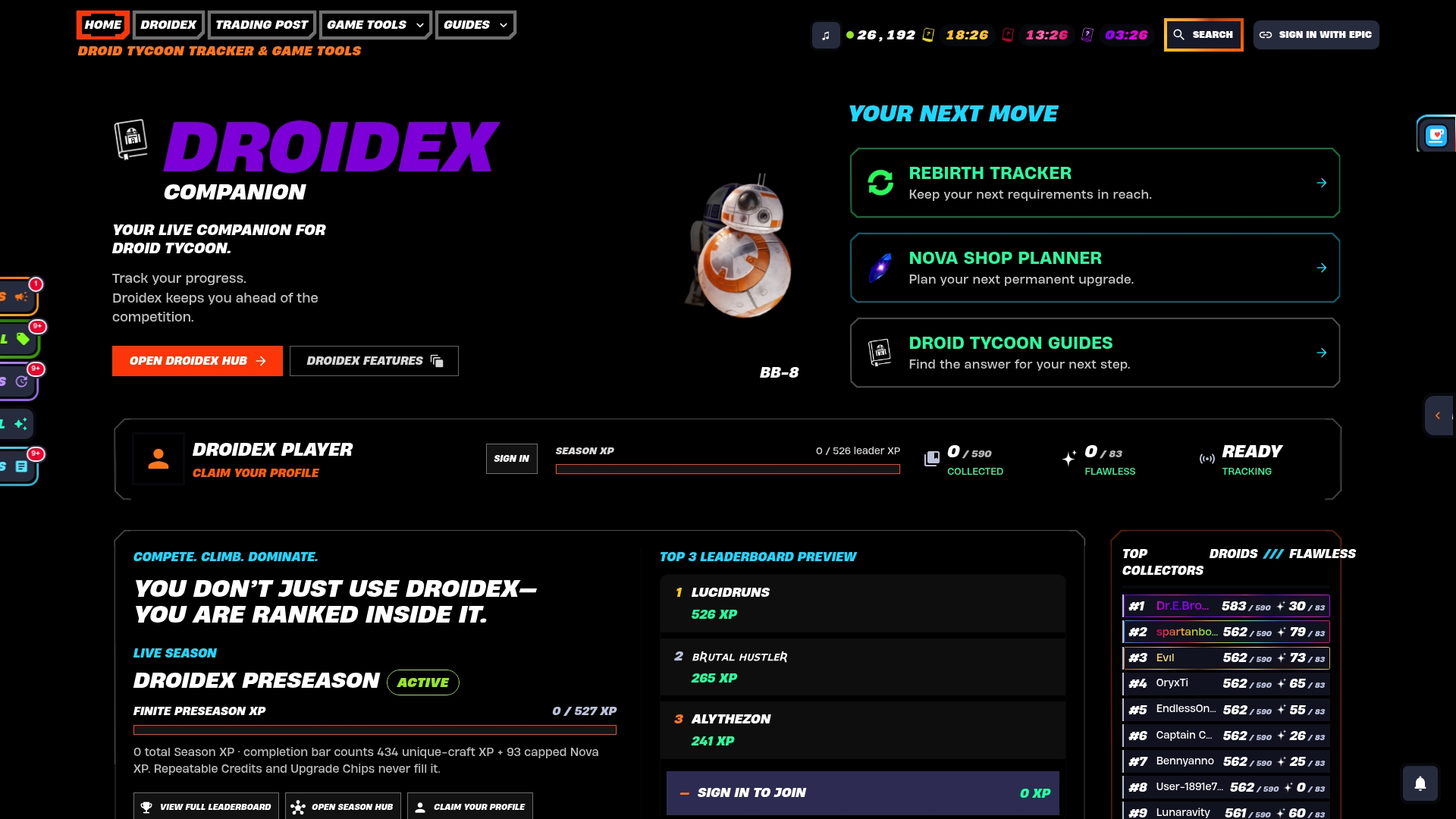
Beyond the core overlay widgets, the app includes:
- Rebirth planning tools tied to the Rebirth Cycles tracker for timing Super Rebirth around Nova Crystal payouts.
- Calculators for upgrade chip costs and base income planning.
- A community stats and leaderboard system for comparing progress against other players.
All features are free to use, with no forced payment tier. Download Droidex Companion directly from the official site and set up your first overlay preset before your next session.
Where to check settings and updates
For rendering and performance settings, Epic Games' own help pages on Performance Mode and low FPS troubleshooting stay current with each patch. For replay and HUD settings, Epic's Fortnite Creative documentation covers My Island UI options in detail. Track Droid Tycoon changes through the v1.26 patch notes whenever a widget stops reading correctly after an update.
Sources
- How do I enable Performance Mode in Fortnite? | Epic Games Help
- Replays feature in Fortnite Creative | Epic Developer Documentation
- Fortnite Droid Tycoon tips | PC Gamer
FAQ
How do you make the most money in Droid Tycoon?
Watching Credits-per-second against conveyor prices lets you swap out underperforming droids before they drag down your income rate. Community guides also point to upgrading droids to higher tiers and keeping an eye on upgrade chips as reliable ways to grow long-term credit generation.
How long does a Droid Tycoon session or run last?
Session length depends entirely on how a player paces farming, upgrades, and rebirth cycles rather than a fixed match timer. Players who use an overlay to track Credits-per-second and rebirth progress tend to move through rebirth cycles faster since they're not manually checking each stat.
What is the highest level in Droid Tycoon?
Droid Tycoon's progression is built around rebirth cycles rather than a single capped level, with Super Rebirth tied to specific active droid requirements and Nova Crystal payouts. Exact tier caps can shift between patches, so checking current patch notes is the most reliable way to confirm what's active.
What is the best strategy for winning Droid Tycoon in Fortnite?
The strongest approach combines steady droid upgrades, regular conveyor sweeps to catch valuable blueprints, and timing rebirth around when active droid requirements are fully met. Overlay tools that track these stats in real time make it easier to act on that strategy without pausing to check menus manually.
Is it safe to use a third-party overlay like Droidex Companion?
Droidex Companion reads visible screen data through local recognition rather than accessing account credentials or modifying game files, which keeps its permission footprint limited to screen capture and overlay display. Downloading only from the official site and checking the verification page is the safest way to confirm you have the legitimate installer.