
Check reward pool, deadline, and redemption path within the first five minutes of any event going live, then sort it into must-claim, schedule, monitor, or skip. That single triage step catches most missed rewards before they happen. Everything else in this event rewards guide, from farming tactics to prioritization math, builds on that one habit.
TL;DR:
- Answer the five key questions—reward pool, deadline, entry cost, redemption path, and miss consequences—within three minutes for effective event triage.
- Prioritize claiming high-value rewards like free characters or weapons that require under two hours to earn; skip minor cosmetics needing excessive time.
- Use a tracker to monitor deadlines, reset patterns, and reward details, with calendar reminders set 24 hours before claim cutoff to avoid missing rewards.
- Focus on farming dailies, using event gear, and grouping activities to maximize reward per hour and minimize unnecessary grinding.
- Understand that expiring currency is usually sandboxed for event balance, so drain it before the event ends, and be aware rewards may be permanently unavailable or rerun on a schedule.
Table of Contents
- The Fast Event Triage Checklist
- Event Reward Types and How They Actually Work
- How to Track Event Schedules Without Missing Deadlines
- A Simple Scoring Method for Which Rewards to Chase
- Farming Tactics That Actually Increase Rewards Per Hour
- Why Events Use Expiring Currency and Exclusivity Rules
- A Copyable Tracker and Checklist You Can Use Today
- Author Perspective: Using a Companion Workflow for Live Events
- Droidex Companion: Tracking Droid Tycoon Events Without the Guesswork
- Sources
- FAQ
The Fast Event Triage Checklist
Every event boils down to five questions. Answer them in under three minutes and you already know more than most players who skim the announcement banner and move on.
- Reward pool: What's actually in the shop or track, and does it include account-defining items or just currency filler?
- Deadline: When does the event close, and does that fall on a workday or a weekend you're likely to be away from?
- Entry cost: Does participation require currency, a ticket, or a login streak you might break?
- Redemption path: Do rewards land automatically, or do you need to manually claim them from a mailbox or shop before a second, quieter deadline?
- Miss consequences: Does missing this event forfeit the reward entirely, or does it roll into a future rerun?
This five-question scan comes straight from the standard seasonal event checklist that live-service veterans use, and it works across genres because the underlying mechanics rarely change.
Once you've answered those five questions, sort the event into one of four buckets:
| Priority label | Meaning | Action |
|---|---|---|
| Must-claim | High-value, hard deadline, no rerun promised | Claim first, schedule reminders |
| Schedule | Good reward, flexible timing | Block a calendar slot |
| Monitor | Unclear value or early-stage event | Check back before deadline |
| Skip | Low value relative to time cost | Ignore |
Bookmark the event's official hub page the moment you spot it, and take a screenshot of your claim confirmation for every reward that isn't purely cosmetic. Support tickets for missing items move faster with proof attached, and you'll thank yourself when a redemption glitch eats a reward you earned fairly.
Event Reward Types and How They Actually Work
Not every reward carries the same weight, and lumping them together is how players waste effort on the wrong grind. Most live-service games split rewards into five broad categories.
- Expiring event currency: Spendable only in that event's shop, worthless once the window closes.
- Permanent currency: Rolls into your general account balance and never expires.
- Cosmetics: Skins, banners, titles. No mechanical value, but often exclusive.
- Free characters or weapons: The highest-value category, since these affect account power directly.
- Consumables and refinement materials: Boost existing gear rather than adding something new.
The event structures themselves repeat across titles, too. Login and web events reward daily check-ins with minimal effort. Milestone shops let you convert grind currency into a fixed list of items at set thresholds. Ladder or challenge modes rank you against other players for tiered rewards. Timed instances are one-shot content windows, often the source of the rarest drops.
Shop windows and redemption codes work differently and get confused constantly. A shop window is a temporary in-game store where you spend event currency directly, usually visible from a menu tab during the event's run. A redemption code is typically an external string posted on social media or a developer blog that you type into a code-entry screen, often for a small currency or item drop unrelated to the main event track. Codes tend to expire faster and get capped per account, so treat them as bonus catches rather than your main income.
How to Track Event Schedules Without Missing Deadlines
Tracking is where most missed rewards actually happen. Not because the reward was hard to earn, but because nobody set a reminder before the window closed.
Build a tracker with five columns before you do anything else:
- Event name and game: So you can scan multiple titles at once.
- Deadline: The hard claim cutoff, not just when the event content ends.
- Reward pool summary: One line describing what's actually worth chasing.
- Reset pattern: Daily, weekly, or one-time, since this determines how often you need to check in.
- Priority label: Must-claim, schedule, monitor, or skip from your earlier triage.
Effective tracking hinges on monitoring these core data points: deadline, reset pattern, reward pool, entry requirements, and time-to-value. Sync each must-claim deadline to a phone calendar reminder set 24 hours before the cutoff, not on the day itself, since redemption steps sometimes require a second action after the reward technically unlocks.
Community wikis and event-list pages are genuinely useful here. A page like the Monster Hunter World event quests list shows how a well-maintained community resource structures rotating content, but verify any code or claim step against the game's official channel before you act on it. Wikis lag behind patches occasionally, and a stale entry can send you chasing a reward that already rotated out.
Timing itself has more slack than players assume. Developers often build in 20 to 40% extra time beyond what the average grind actually requires, so a track needing seven play sessions frequently runs 10 to 14 days instead of seven. That buffer exists specifically so weekend-only players aren't excluded, which means panic-grinding on day one is rarely necessary.
Pro Tip: Set your calendar reminder for the event's midpoint, not just the deadline. A midpoint check catches redemption bugs or currency caps while you still have time to fix them.
A companion tool that overlays live timers on your screen removes the manual math entirely, particularly useful in games with several concurrent event tracks and no in-game countdown.

A Simple Scoring Method for Which Rewards to Chase
Time-to-value is the ratio between what a reward is worth to your account and how long it takes to earn it. Score every event activity on this scale before committing hours to it, and you'll stop grinding events that pay out worse than your regular dailies.
Use a three-tier system:
- Tier 1: Free characters, weapons, or permanent currency requiring under two hours total. Always claim.
- Tier 2: Strong cosmetics or large currency drops requiring moderate grinding, roughly two to six hours. Schedule if the deadline allows.
- Tier 3: Minor cosmetics or small currency requiring disproportionate time. Skip unless you're already playing daily anyway.
Flagship events, the headline seasonal content most live-service games run a few times a year, typically deserve top priority because they bundle the best total reward package available to free-to-play players, including characters and large currency drops you won't see again until the next flagship.
Here's a worked example. Say a hypothetical event offers a free weapon at the top milestone, requiring 15 total dailies over 12 days, alongside a cosmetic banner at a lower milestone requiring only 5 dailies.
| Reward | Time required | Tier | Verdict |
|---|---|---|---|
| Free weapon (top milestone) | 15 dailies | Tier 1 | Must-claim, schedule dailies |
| Cosmetic banner | 5 dailies | Tier 2 | Schedule if convenient |
| Bonus login currency | 2 minutes/day | Tier 1 | Always claim |
The weapon clears Tier 1 because it's a permanent power gain. The banner sits at Tier 2 because it's optional, but cheap enough that skipping it wastes free value. The login currency costs almost nothing, so there's no real argument for skipping it even if you don't care about the main track.
Farming Tactics That Actually Increase Rewards Per Hour
Efficiency during an event comes down to sequencing, not just grinding harder. Follow this order and you'll consistently earn more per session than players who jump straight to the newest content.
- Clear dailies and weeklies first: These usually have the best reward-to-time ratio and often reset on a fixed clock, so delaying them wastes free value every day you skip.
- Use boosters and event-specific gear immediately: Many events hand out temporary multipliers or gear that only work during the event window. Sitting on them unused is a direct loss.
- Stack activities where mechanics allow: If a single farming run counts toward both a daily quest and an event milestone, run it during your event session rather than splitting the two.
- Route efficiently: Plan a single loop through objectives instead of backtracking, especially in open-world or hub-based games where travel time adds up fast.
- Group for shared drops when the game supports it: Multiplayer content often distributes rewards to everyone present regardless of who lands the final hit, so grouping multiplies your output for the same time spent.
- Farm during peak windows if the event has scaling difficulty or bonus modifiers: Some titles increase drop rates during specific hours or weekend windows. Check the event page for these modifiers before committing a long session to off-peak farming.
Reward treadmill fatigue is a real design risk. Repeating the same small XP or coin reward for ten straight days produces diminishing returns on motivation, according to quest system design research. If a track starts feeling like a chore, that's usually a signal to drop it to Tier 3 and redirect the time toward a different event running in parallel.
Why Events Use Expiring Currency and Exclusivity Rules
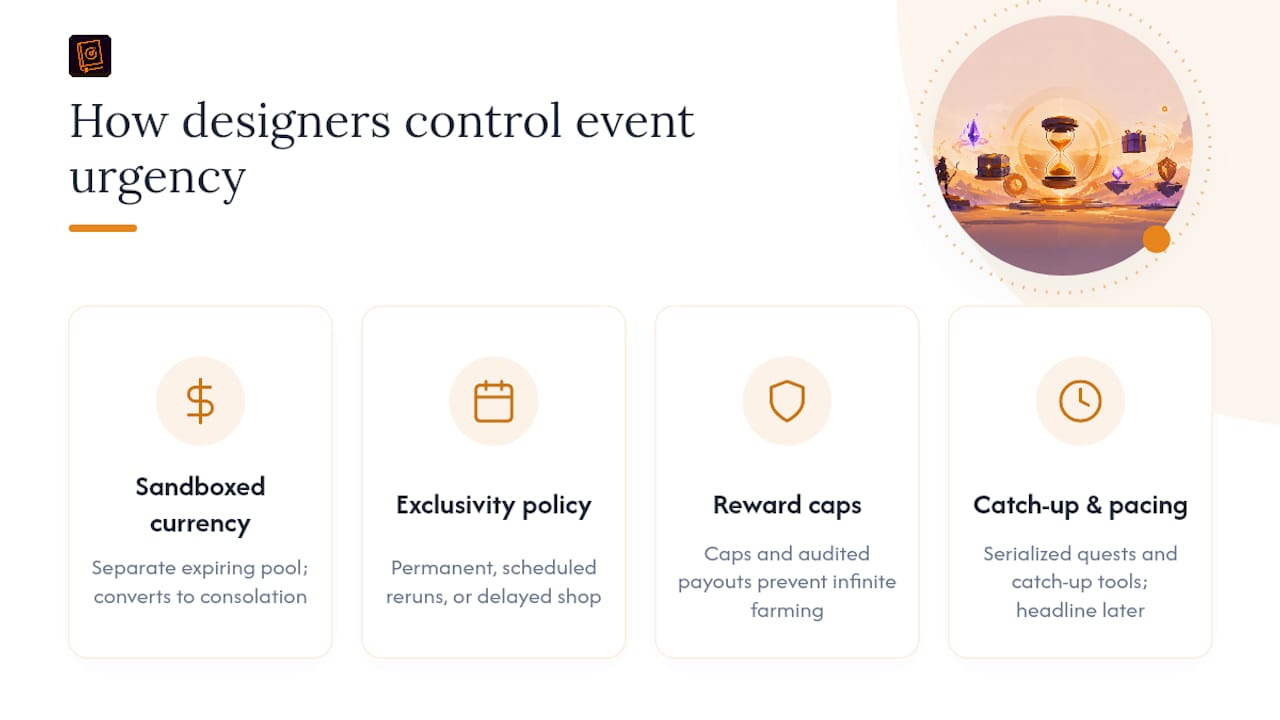
Understanding the designer's side of an event changes how you spend your time inside it. Most live-service teams deliberately sandbox event currency into a separate, expiring pool rather than folding it into the main economy.
Designers recommend sandboxing event currency, capping how much any single player can extract, and publishing an explicit exclusivity policy up front so players know what happens to the reward after the event ends.
That separation exists for a specific reason: it lets designers tune earn rates for a two-week event without permanently distorting the currency you'll use for the rest of the year, based on live event design guidance. Any currency left in your balance when the event ends is usually converted into a smaller consolation reward rather than carried forward, which is why draining your event currency completely before the deadline matters more than draining your regular currency.
Exclusivity policy is the other lever worth watching. Some studios make event rewards permanently unavailable after the window closes. Others schedule reruns on a fixed cadence, and a smaller group delays availability into a future general shop. None of these approaches is inherently better, but each changes your urgency calculation. A permanently exclusive weapon justifies a Tier 1 push even during a busy week. A reward with a confirmed rerun schedule can safely drop to Tier 2 or Tier 3 if your week is already full.
Reward caps and audited payouts serve a similar purpose from the designer's side: they stop players from infinitely farming a single mechanic and protect the value of the reward for everyone who earns it the intended way. Events built around constant, unbroken presence tend to breed resentment among players with irregular schedules, which is why better-designed events increasingly include catch-up mechanics or serialized quest structures that let late joiners still walk away with the headline reward.
Pro Tip: If an event's early tasks feel unusually generous, that's often intentional pacing. Designers frequently place the biggest headline rewards later in the track while front-loading small wins to keep engagement high in week one.
A Copyable Tracker and Checklist You Can Use Today
Paste this column structure into any spreadsheet and you have a working tracker in under two minutes.
| Column | What goes here |
|---|---|
| Game | Which title the event belongs to |
| Event name | Exact name from the official page |
| Reward | One-line summary of the top-value item |
| Deadline | Hard claim cutoff date |
| Reset pattern | Daily, weekly, or one-time |
| Priority | Must-claim, schedule, monitor, or skip |
| Claim status | Not started, in progress, claimed |
For the calendar side, keep the reminder phrasing consistent so you can scan your calendar at a glance:
- "[Game] [Event] deadline in 24h, claim status: [in progress/not started]"
- "[Game] [Event] midpoint check, verify redemption path"
- "[Game] [Event] final claim window closes tonight"
Screenshot every claim confirmation and store it in a single dated folder rather than scattered across your camera roll. When a support ticket asks for proof of completion, you want that image found in seconds, not buried among fifty unrelated screenshots.
Author Perspective: Using a Companion Workflow for Live Events
Manual trackers work, but they fail quietly. You forget to update a cell, miss a reset, and the reward is gone before you notice. A companion overlay that shows live timers alongside your gameplay solves the exact failure point a spreadsheet can't: it puts the deadline in your field of view while you're actually playing, not in a browser tab you forgot to open.
That workflow benefits grinders and casual players differently. Grinders get precision on peak-window farming. Casual players get a safety net against the missed-claim scenario that hurts the most, a free character or weapon lost to a forgotten deadline.
— Daniel
Droidex Companion: Tracking Droid Tycoon Events Without the Guesswork
If Droid Tycoon is your game, the checklist above gets easier with a tool built specifically around its mechanics rather than a generic spreadsheet. Droidex Companion is the alternative to manual tracking for Droid Tycoon event rewards: live stat tracking, rebirth planning, and customizable overlays powered by local screen recognition, so you see event timers and progress without alt-tabbing out of the game.
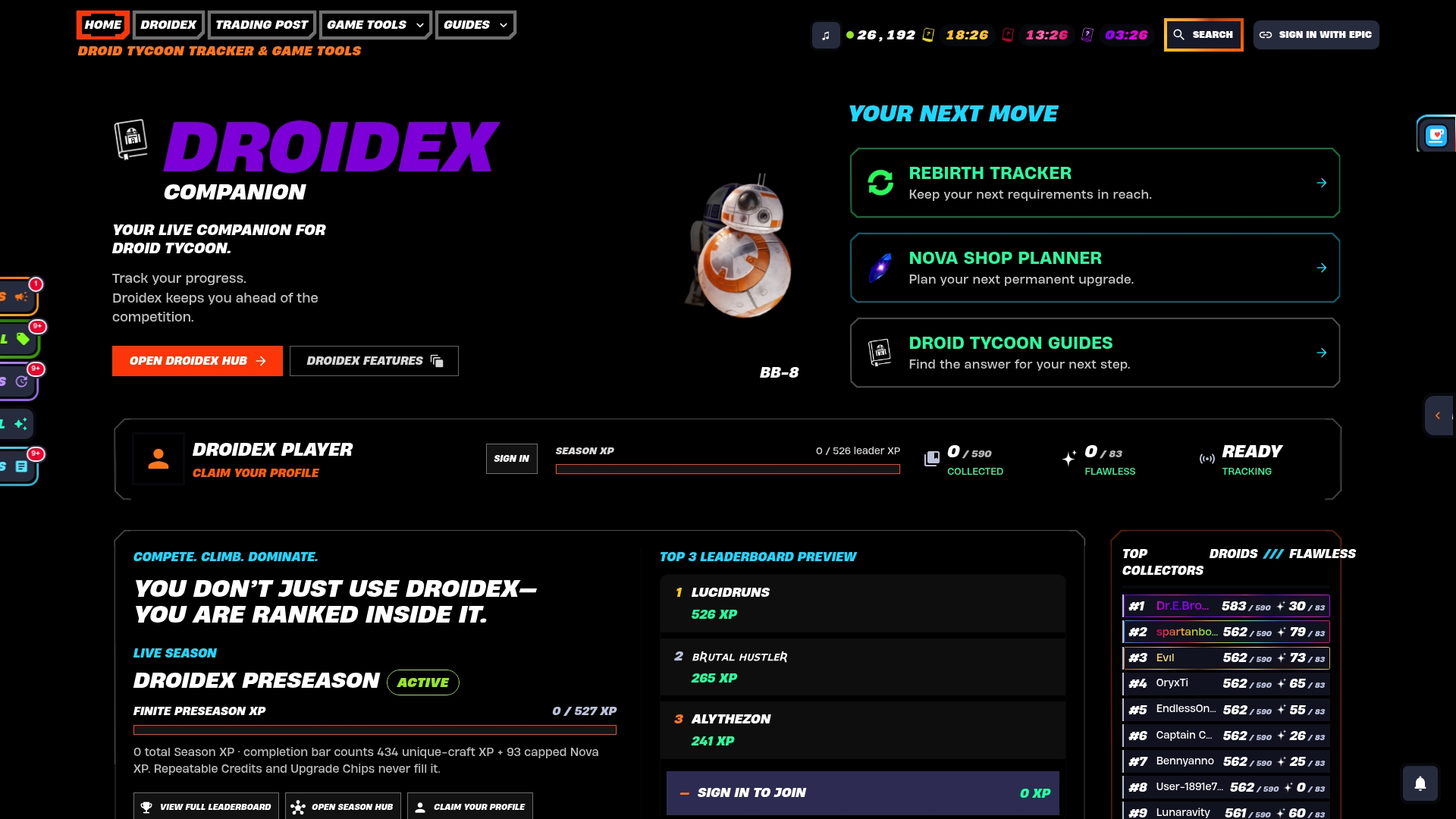
The app includes features such as overlay timers and a rebirth planner available to users. Local screen recognition means the app reads your own screen to track stats and progress, and that data never needs to leave your machine to power the overlay. Pair it with the rebirth cycle tracker to plan your event grinding around your next rebirth window, or check the base income and chip cost tools to score whether a given event reward is worth the time before you commit to the grind. Download the app and set up an event overlay to assist with tracking during Droid Tycoon events.
Sources
- Gamedesign
- Seasonal event checklist for in-game rewards | GamesReward
- Dialect Inc. on live-service game design
- Event Quests List | Monster Hunter World Wiki
FAQ
What Is the Fastest Way to Triage a New Event?
Answer five questions in under three minutes: reward pool, deadline, entry cost, redemption path, and miss consequences. Sort the result into must-claim, schedule, monitor, or skip using the checklist model most seasoned live-service players rely on.
How Do I Know if an Event Reward Is Worth My Time?
Score it using time-to-value: Tier 1 rewards (free characters, weapons, permanent currency) under two hours are always worth claiming. Tier 3 rewards requiring disproportionate time for a minor cosmetic can usually be skipped.
Why Do Some Events Use Expiring Currency Instead of Permanent Currency?
Expiring event currency lets designers tune earn rates for a limited window without permanently distorting the main game economy. Any leftover currency typically converts to a smaller consolation reward once the event closes.
Does Droidex Companion Track Event Rewards Automatically?
Droidex Companion uses local screen recognition to track live stats and overlay timers for Droid Tycoon, which speeds up event monitoring compared to a manual spreadsheet. Current pricing and download details are available on the Droidex site.
How Much Extra Time Should I Budget Beyond an Event's Published Window?
Add roughly 20 to 40% slack beyond what the grind mathematically requires. A track needing seven sessions often runs 10 to 14 days specifically to accommodate players who only log in on weekends.