

Yes, a working performance tracking dashboard exists for Droid Tycoon, and Droidex Companion is the practical way to run one. The app delivers live stats, rebirth planning, custom overlays, and competitive leaderboards by reading your Fortnite window locally, with no manual data entry required. Every core capability below runs during live play, and setup takes about five minutes. Skip to the download details in the final section if you're ready to install it now.
TL;DR:
- Most players benefit from focusing on credits/sec, held droid, next rebirth requirement, and blueprint timer in their overlay for quick decision-making.
- The live player count updates every five minutes via Epic's API, highlighting off-peak times for better leaderboard positioning.
- Real-time tracking of droid requirements for rebirth prevents accidental selling of essential variants and refines inventory planning.
- Initial setup of Droidex Companion is quick, requires no data transmission, and can be done during any gaming session without interruptions.
- Visual recognition can occasionally misread conveyor items or droid names, but restarting scans or re-anchoring overlays restores accuracy.
Table of Contents
- What a Droid Tycoon Performance Tracking Dashboard Should Track
- How Do You Set Up Live Stat Tracking During Play?
- How Do You Plan Rebirth Timing With a Tracker?
- Designing Overlays That Actually Help Mid-Game
- Using Leaderboards and Live Player Counts to Time Sessions
- Where the Numbers Actually Come From
- Troubleshooting Common Live Tracking and Overlay Problems
- What Changed When I Actually Tracked My Rebirth Timing
- Get Droidex Companion Running Tonight
- Sources
- FAQ
What a Droid Tycoon Performance Tracking Dashboard Should Track
A performance tracking dashboard for Droid Tycoon needs to answer one question at every moment: is this base making money efficiently right now, or is it time to change something? That means surfacing live numbers, not just static reference data.
The core live stats worth pinning are:
- Credits/sec: your current production rate, plus a rolling estimate of recent earnings so you can spot a dip before it costs you a full cycle.
- Player and rebirth level: where you stand in the progression curve, since rebirth requirements scale with level.
- XP and credit multipliers: stacked bonuses that change whether a purchase pays for itself in minutes or hours.
- Scrap production and sell bonuses: passive income streams that often get ignored next to droid income.
- Workshop capacity and companion slots: hard caps that determine whether you can even add the droid you're eyeing.
The tradeoff that trips up most players is Beskar cost versus passive perk value. A droid with a steep Beskar upgrade cost can still outperform a cheaper option if its passive perk compounds over a long farming session, but only a dashboard that tracks income per droid in real time makes that comparison obvious instead of guesswork. The core gameplay loop rewards buying and upgrading droids based on their income output, which means credits/sec by droid, not just by base, is the single most useful number you can have on screen.
How Do You Set Up Live Stat Tracking During Play?
Getting Droidex Companion running takes a few minutes, and none of it interrupts a session already in progress. The app is a desktop tool that captures only your Fortnite window using local screen recognition and OCR, so no data leaves your machine and no login or account link is required.
- Download and install Droidex Companion, then launch it before or after starting Fortnite (order doesn't matter).
- Grant screen capture permission when prompted so the app can read your Droid Tycoon window.
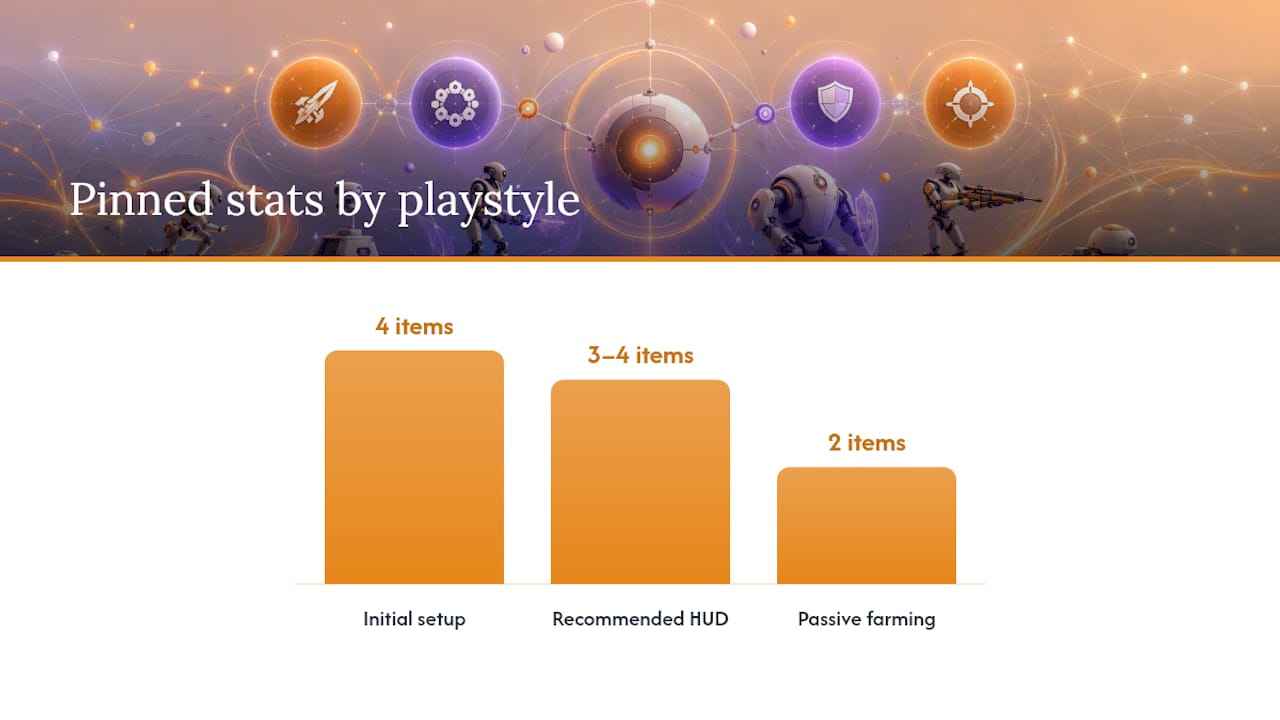
- Open the overlay settings and pin your first four stats. A solid starting layout is credits/sec, held droid name, next-required rebirth droid, and a blueprint timer.
- Adjust the overlay position so it sits clear of your hotbar and inventory panel.
- Switch pinned stats as your goal changes: swap in rebirth progress during a push, or drop to just credits/sec and scrap output during a passive farming session.
Early-game players usually want an income-focused HUD to prioritize purchases. Mid-game players prepping for rebirth benefit from a checklist-style overlay instead. Passive farmers can run with two stats and nothing else.
Pro Tip: Keep your overlay to three or four pinned items. A compact HUD reduces decision time compared to a full dashboard view, especially during fast rebirth pushes where every second of screen reading counts.
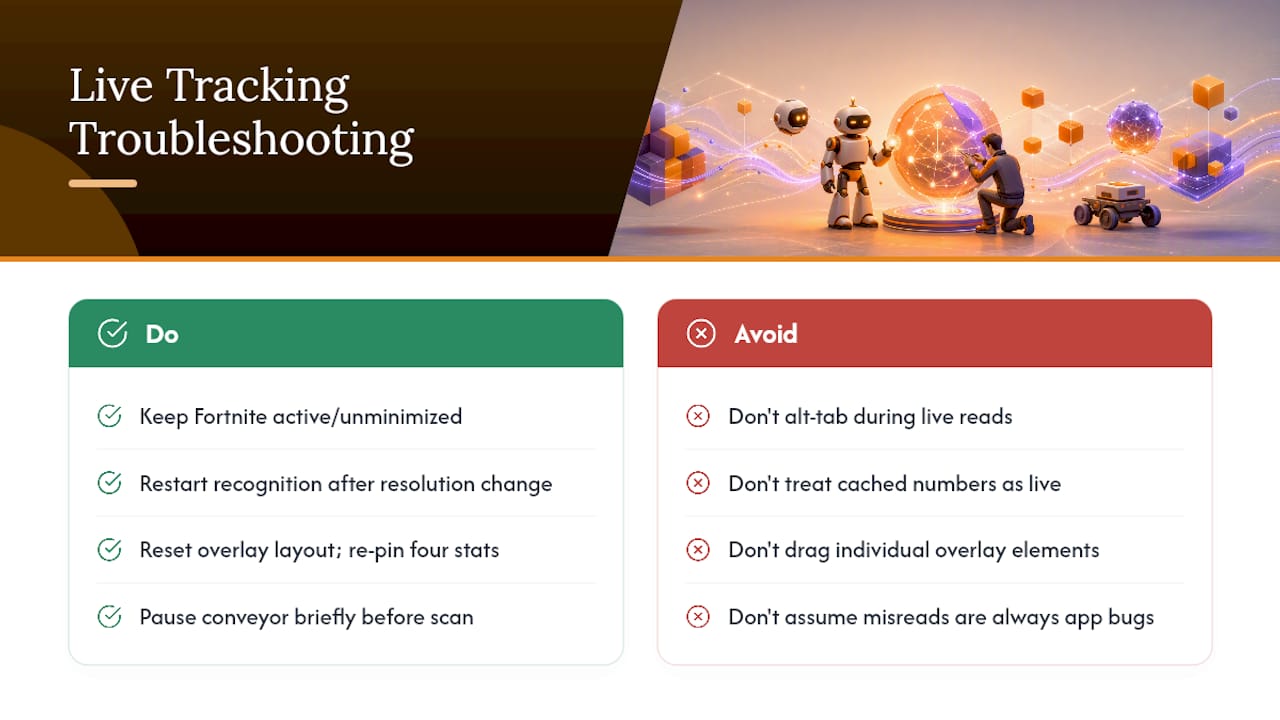
If the app ever loses the window (alt-tab, minimize, resolution change), it falls back to cached stats and last-known rebirth progress instead of showing blank fields.
How Do You Plan Rebirth Timing With a Tracker?
Rebirth in Droid Tycoon isn't just a level threshold. It requires specific droids, and in some cases specific upgraded variants, to be physically present in your collection at the moment you trigger it. The in-game interface doesn't show you a running tally against those requirements, which is exactly the gap a rebirth tracker fills.
The Rebirth Cycles tracker shows you three things at a glance:
- The exact droids and variants required for your next rebirth tier.
- Which requirements you've already satisfied.
- How many items remain, updated live as your collection changes.
That live count changes how you treat inventory decisions. A droid that looks safe to sell might actually be a required variant for your next rebirth, and marking items as safe to sell only after the tracker confirms they're not needed prevents that mistake. Budgeting matters just as much as inventory: use a base income and cost planner to total up Nova and chip upgrade costs against your current credits/sec, so you know whether you're two minutes or twenty minutes from being ready. Export or sync your plan between sessions so a rebirth push started tonight doesn't reset to zero tomorrow.
Designing Overlays That Actually Help Mid-Game
An overlay only earns its screen space if every element on it changes a decision you're about to make. Clutter defeats the purpose, and a dashboard crammed with every available stat slows you down more than it helps.
Pin these four, and drop the rest:
- Credits/sec, so you can catch production drops immediately.
- Held droid or blueprint timer, so you never let a craft finish and sit idle.
- Base ownership status, especially if you're managing more than one plot.
- Equipped companions, since slot changes affect multipliers instantly.
Turn on alerts for rebirth threshold reached, rare droid spawns, and blueprint expiry. Those three cover the moments where missing a notification actually costs progress.
Local OCR reads conveyor belt items and held-droid names directly off screen, and it's reliable in most conditions. Fast-scrolling conveyors or unusual UI scaling can occasionally cause a false negative. If a read looks wrong, a quick re-scan or brief pause usually corrects it.
Pro Tip: Solo farming runs do fine with a minimal two-stat overlay. Leaderboard pushes justify a fuller layout, since you're actively comparing your pace against a live benchmark.
Using Leaderboards and Live Player Counts to Time Sessions
Leaderboards only matter if you know when the competition is thin. Droidex's live player counter pulls from Epic's Ecosystem API and refreshes roughly every five minutes, giving you a near real-time read on how many players are active right now, not a stale daily snapshot.
Pair that with the community statistics page to spot patterns:
- Daily peaks and retention charts show you when player counts are highest, useful if you're chasing leaderboard visibility.
- Off-peak windows tend to have less competition for top credits/sec rankings, making them a better time to attempt a personal best.
- Track your own benchmarks against tiered credits/sec ranges and rebirth timing targets rather than chasing a single top spot.
One privacy note worth stating plainly: your live stats and overlays stay local to your machine. Leaderboard entries only reflect data you or the community actively submit, not passive surveillance of your session.
Where the Numbers Actually Come From
Live stats come from two different sources, and knowing which is which matters if a number ever looks off. In-game reads, credits/sec, held droid, rebirth progress, come from local OCR scanning your own screen. Player counts and community-wide figures come from Epic's Ecosystem API instead.
Behind the scenes, Droidex generates its static pages, value lists, rebirth requirements, stats charts, from a single source file called site/data.js, and archives daily metrics so historical trends survive past Epic's short rolling data window.
- Updates ship with versioned release notes, so you can see exactly what changed and when.
- Tracked droids get their income, Beskar cost, and rebirth data refreshed from a central verified source.
- If you spot a number that looks wrong, checking the latest patch notes usually explains it before you assume the tracker is broken.
Troubleshooting Common Live Tracking and Overlay Problems
Most issues trace back to one of three causes: window visibility, resolution mismatch, or a stale overlay position.
If stats stop updating, check that Fortnite is the active, unminimized window. Local OCR needs a clear view of the game to read anything, and alt-tabbing away pauses live reads until you return. The cached fallback keeps last-known numbers on screen so you're not staring at blanks, but treat those as a snapshot, not a live figure, until the app reconnects.
Resolution or UI scale changes mid-session are the next most common culprit. If you switch display settings or resize the game window after launching the Companion, recognition accuracy can drop temporarily. Restarting the recognition pass, usually a single click in the app, resolves this in most cases.
Overlay elements drifting off screen or overlapping your hotbar usually means the pin positions were set at a different resolution. Reset the overlay layout and re-pin your four stats rather than dragging individual elements, since a full reset accounts for scale differences more reliably.
If a specific droid or item consistently misreads, it's often a conveyor-belt timing issue rather than an app bug: fast-scrolling item queues can outpace a single scan. A brief pause on the conveyor before the read usually fixes it. Persistent mismatches are worth checking against the latest patch notes, since droid stat changes sometimes lag behind an update on either side.
Privacy concerns are rare but worth addressing directly: because recognition is local-first, nothing about your screen or session gets transmitted unless you actively submit data to a community stats page.
What Changed When I Actually Tracked My Rebirth Timing
Before running a live tracker, rebirth timing was a guess based on gut feel and a mental tally that was usually wrong by two or three droids. Watching the Rebirth Cycles requirement count tick down in real time changed that into a schedule instead of a hope. Companion apps generally push players toward more data-driven decisions, and rebirth timing is where that shows up fastest. The bigger shift wasn't the data itself. It was building the habit of checking the tracker before every major decision, not after.
— Daniel
Get Droidex Companion Running Tonight
If you've read this far, you already know what's slowing your rebirth timing down: guesswork instead of a live number. Droidex Companion replaces that guesswork with a dashboard that reads your own screen, so nothing depends on outdated wikis or manual math between sessions.
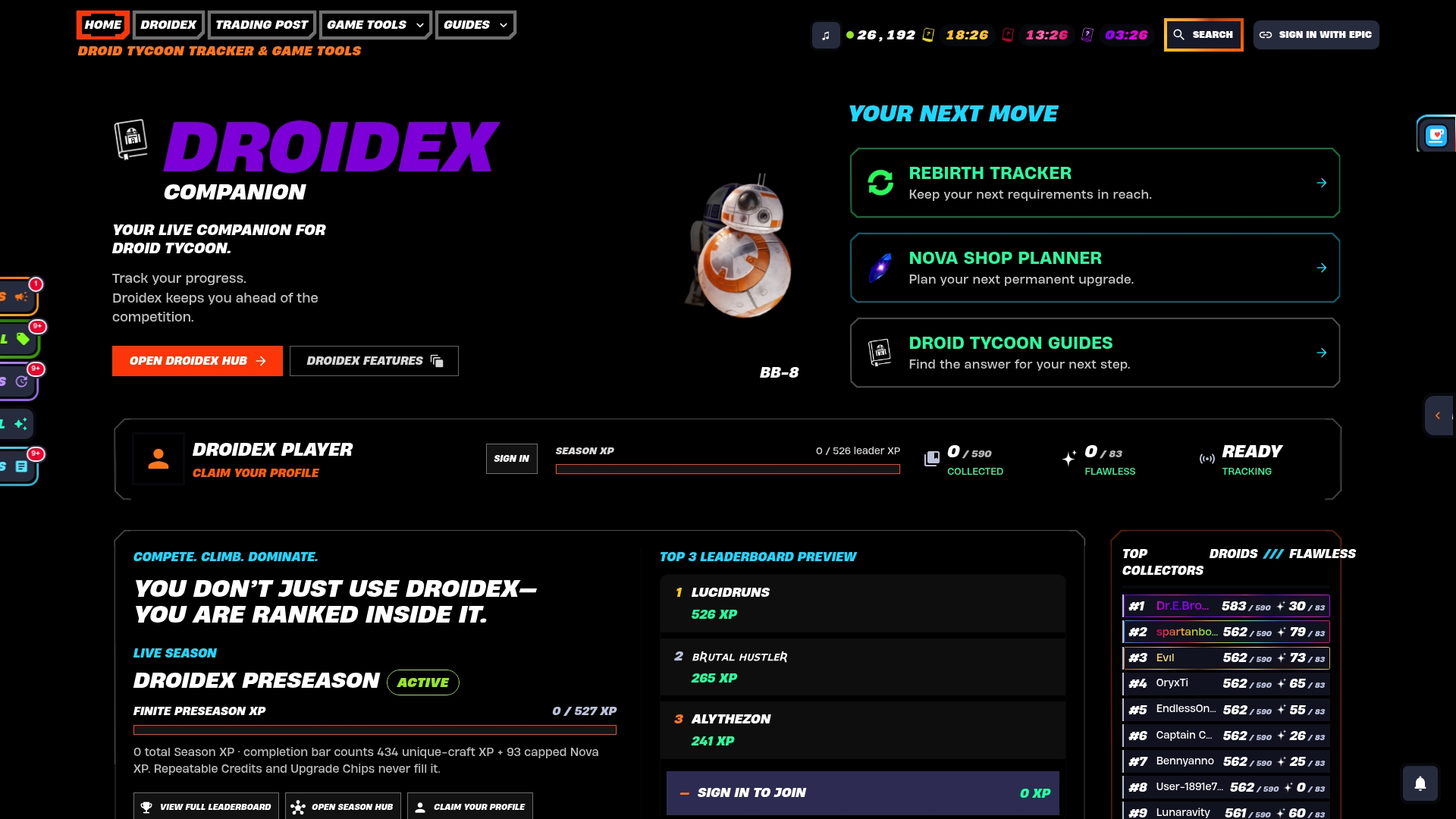
Start with two features first. Pin the compact live overlay so credits/sec and held droid status are always visible without cluttering your screen, then open the Rebirth Cycles tracker to see exactly which droids and variants stand between you and your next rebirth. Both work together: the overlay tells you what's happening right now, the tracker tells you what's still needed. If you'd rather plan your credit budget before touching the overlay, the base income and cost tools give you the numbers to work backward from a rebirth date to a daily income target. Download the app, run the setup steps above, and your next session starts with a plan instead of a guess.
Sources
The Droidex GitHub project documents the data pipeline behind the dashboard, including static page generation and metric archiving. The Overwolf app listing covers installation and the local OCR approach in detail. For general Droid Tycoon mechanics and rebirth requirements, PC Gamer's beginner guide remains a solid outside reference. The community statistics page shows live player counts and historical peaks in practice.
FAQ
Is Droidex Companion Free to Use?
Yes, There is a free downloadable companion app available with core features like live stats, overlays, and a rebirth tracker. Support is optional through donations rather than required purchases.
Does the Dashboard Track My Data Remotely?
No, live stat tracking uses local screen recognition and OCR that reads only your own Fortnite window, and that data doesn't leave your machine unless you choose to submit it to a community stats page.
What Should I Pin First in the Overlay?
Start with credits/sec, held droid name, next-required rebirth droid, and a blueprint timer. That four-stat layout covers income, active crafting, and rebirth progress without cluttering your screen.
How Often Does the Live Player Counter Update?
The player counter refreshes roughly every five minutes, pulling from Epic's Ecosystem API rather than a delayed daily snapshot.
Why Would a Droid I Own Still Be Required for Rebirth?
Rebirth thresholds often require specific upgraded variants, not just any copy of a droid, so selling one before checking the Rebirth Cycles tracker can cost you a requirement you didn't know you needed.