
To track session stats in Droid Tycoon, record a fixed set of numbers at the start of a session, capture the same numbers at regular points during it, and compare the end state against the start. Doing this by hand works for a few minutes. Over a long session it breaks down, which is why most competitive players hand the job to a companion app that reads the screen and logs the values for them.
This guide covers what a session is, which stats are worth recording, how often to sample them, how to read the results, and how Droidex Companion automates the process on Windows.
TL;DR
- A session record needs a start snapshot, periodic samples and an end snapshot. Without all three you cannot calculate a rate.
- Track a small, fixed set of stats. Four well-chosen values beat twenty that you never review.
- Droidex Companion reads the game screen locally on your PC, so live stats are logged without typing and without sending screenshots anywhere.
- Compare sessions of equal length and equal setup, or the numbers tell you nothing.
Table of Contents
- What a session means in Droid Tycoon
- Which stats to record
- How often to sample
- Why manual tracking falls short
- How screen recognition tracks stats
- Setting up session tracking with Droidex Companion
- Reading your results
- Tracking a collection across sessions
- Our perspective
- Try it on your next session
- FAQ
- Sources
What a session means in Droid Tycoon
A session is one continuous block of play with a defined start and a defined end. For tracking purposes, the start is the moment you take your first snapshot and the end is the moment you take your last one. Everything between them is what you are measuring.
The definition matters because rates only make sense inside a boundary. "I earned a lot today" cannot be compared with anything. "I gained X income per minute across a 45-minute session with the same droid setup" can be compared with last week's result.
Two boundary rules keep your data clean:
- Fixed length. Pick a duration such as 30 or 60 minutes and stick to it for comparisons. Sessions of different length distort any total you record.
- Fixed setup. If you change your droid lineup, boosts or layout mid-session, split the record into two sessions at that moment.
A crash is the other boundary case. If the game closes unexpectedly, treat the crash point as the end of one session and the reconnect as the start of the next. Our guide on how to resume stat tracking after a Droid Tycoon crash walks through that handoff.
Which stats to record
The right set depends on your goal. A player pushing toward a rebirth needs different numbers from a player testing whether a new droid is worth its cost. Start from the decision you want to make, then choose the stats that inform it.
| Goal | Stats to record | Why it matters |
|---|---|---|
| Plan a rebirth | Current income rate, collection progress, requirement progress, time spent | Shows how far you are from the threshold and how long the remaining gap takes at your current rate |
| Test a new droid or boost | Income rate before and after, XP gain per minute | Isolates the effect of one change |
| Improve pacing | Gain per 10-minute block, idle time | Reveals where in a session your output drops |
| Compete on leaderboards | Session totals, personal best, consistency across sessions | Separates one lucky run from a repeatable result |
For most players, four stats cover the rebirth case. Our post on recording four Droid Tycoon stats for rebirth planning explains the selection in detail, and the rebirth cycles tracker lists the requirements those stats are measured against.
Keep the set small
Every extra stat adds a reading to each sample and one more number to reconcile at the end. Players who track too many values usually stop reviewing them within a week. Choose the minimum set that answers your current question, and change the set only when the question changes.
Record units, not impressions
Write the number and its unit every time. "High income" is an impression. "Income per minute" with a figure is data. When a stat is shown in abbreviated form on screen, note the displayed value and keep the same rounding in every sample so the differences stay meaningful.
How often to sample
Sampling frequency is a trade-off between detail and effort. Too few samples hide the shape of the session. Too many turn play into data entry.
A workable pattern for a 60-minute session:
- Take the start snapshot before any action.
- Sample every 10 minutes, giving six interval readings.
- Take the end snapshot at minute 60.
- Calculate the gain for each interval and for the whole session.
Interval gains show you where the session slowed. If the first three blocks produce similar gains and the fourth drops sharply, the cause is usually something specific: a resource ran out, a task was waiting on you, or your attention drifted. Our session pacing strategy article covers how to respond to each pattern.
A worked example
The figures below are illustrative, not measured from the game. They show the arithmetic, not typical Droid Tycoon values.
| Minute | Total XP | Gain in block | Gain per minute |
|---|---|---|---|
| 0 | 1,000 | n/a | n/a |
| 10 | 1,600 | 600 | 60 |
| 20 | 2,210 | 610 | 61 |
| 30 | 2,800 | 590 | 59 |
| 40 | 3,100 | 300 | 30 |
| 50 | 3,700 | 600 | 60 |
| 60 | 4,300 | 600 | 60 |
The session total is 3,300 XP over 60 minutes, or 55 per minute. That average hides the real story. Output held near 60 per minute except in the minute 30 to 40 block, where it halved. A player who only looked at the final total would not know that one block cost roughly 300 XP. A player with interval samples can ask what happened in that window and fix it.
Why manual tracking falls short
Manual logging works for a short test. Over longer sessions it has three weaknesses.
- It interrupts play. Alt-tabbing to a spreadsheet pulls attention from the game at the moment you are trying to measure it.
- It is inconsistent. Samples drift off schedule, and a sample taken at minute 12 instead of 10 skews the interval gain.
- It invites transcription errors. Copying a long number by eye produces mistakes that compound when you compute rates.
An automated tracker removes all three problems because it samples on a schedule and reads the values directly from the screen.
How screen recognition tracks stats
Games that offer no public data feed leave players with one source of truth: what is drawn on the screen. Screen recognition captures the game window, locates the stat readouts and converts the pixels into numbers. Windows itself provides a screen capture API for apps, which is the general mechanism that capture-based tools build on.

Where the recognition runs matters. In Droidex Companion it runs locally on your PC. The frames are analyzed on your machine, which keeps the readings fast enough to follow live changes and keeps the process independent of a remote server. For a deeper look at the safeguards around the tracking process, see the four layers that secure session tracking.
Accuracy depends on setup
Recognition quality depends on what the tool can see. A cluttered layout, a stat readout hidden behind another window or an unusual display scale can all reduce reliability. Keep the game window unobstructed and your display settings stable between sessions. The post on stat tracking accuracy explains how measurement error shows up in sports and games alike, and why a consistent setup matters more than a perfect one.
Setting up session tracking with Droidex Companion
Droidex Companion is a free Windows app built for Droid Tycoon players. Its live tracking covers in-game stats, rebirth planning and collection management, and it adds customizable overlays and a leaderboard. A full walkthrough is in the 5 minute Droidex setup guide. The short version follows.
- Install the app on the Windows PC that runs Droid Tycoon.
- Start the game and let the app detect the game window.
- Arrange your overlay so the stats you chose earlier sit where you can see them without covering gameplay.
- Start a session, play for your fixed duration and end the session.
- Review the interval gains and the total, then note anything that changed.
Because the app samples for you, step 4 involves no manual entry. You play and the record builds itself.
Use overlays to keep your set small
Overlay customization is the practical way to enforce the small-set rule. Show only the stats attached to today's question. A rebirth push needs progress toward requirements on screen. An A/B test needs the income rate. If you want to run a controlled comparison of two setups, the guide to 10-minute A/B tests with live XP tracking shows the method step by step.
Reading your results
Collecting data is half the work. The other half is reading it without fooling yourself.
Compare like with like
A 30-minute session cannot be compared with a 60-minute one by total. Compare rates, and only between sessions that share a setup. Changing two things at once makes the cause of any difference impossible to separate.
Look for the dip
The worked example above shows the most useful pattern: a block that underperforms its neighbors. Find those blocks first. Fixing one recurring dip usually improves a session more than tuning a part that already performs well.
Track consistency, not only peaks
A personal best is one data point. Five sessions within a narrow band tell you the result is repeatable. If you plan to compete, the spread between your best and worst sessions says more about your readiness than the best session alone. The community statistics page gives you a reference point for how your numbers sit against other players.
Tie stats to a decision
Every review should end with one action. Examples: swap a droid and rerun the same session length, change when you collect, or delay a rebirth until a requirement is met. A review with no decision attached is only a log. If a particular droid is under test, its page, such as DJ R-3X stats, variants and effect, gives you the values to compare against what you observe.
Tracking a collection across sessions
Session stats describe a single block of play. Collection progress spans many sessions, and it is where failed rebirths tend to start. A rebirth attempted with a missing requirement wastes the session that led up to it.
A simple tracker with one row per item and a column for each requirement keeps the picture honest. The 6 column Droid Tycoon collection tracker lays out the layout, and Droidex Companion's collection management does the same job inside the app. Review it at the start of every session so the day's play targets what is actually missing.
Our perspective
We built Droidex Companion because the useful numbers in Droid Tycoon are on the screen but nowhere you can export them from. Players ended up with notebooks and spreadsheets that were out of date within minutes.

Our view is that the tracking tool should do the sampling and the player should do the thinking. That is why recognition runs locally: it lets the app follow live values without asking you to type or upload anything, and it keeps the main features free. Players who donate through Ko-fi support development, but nobody has to pay to use any core feature.
We also think most players track too much. A short, fixed set of stats, reviewed after every session, outperforms a dashboard full of numbers that nobody reads. Pick the question first, then the stats.
— Daniel
Try it on your next session
If you want session records without the spreadsheet, Droidex Companion handles the capture, the interval math and the overlay in one Windows app. It is free to download, and all main features are available without payment.
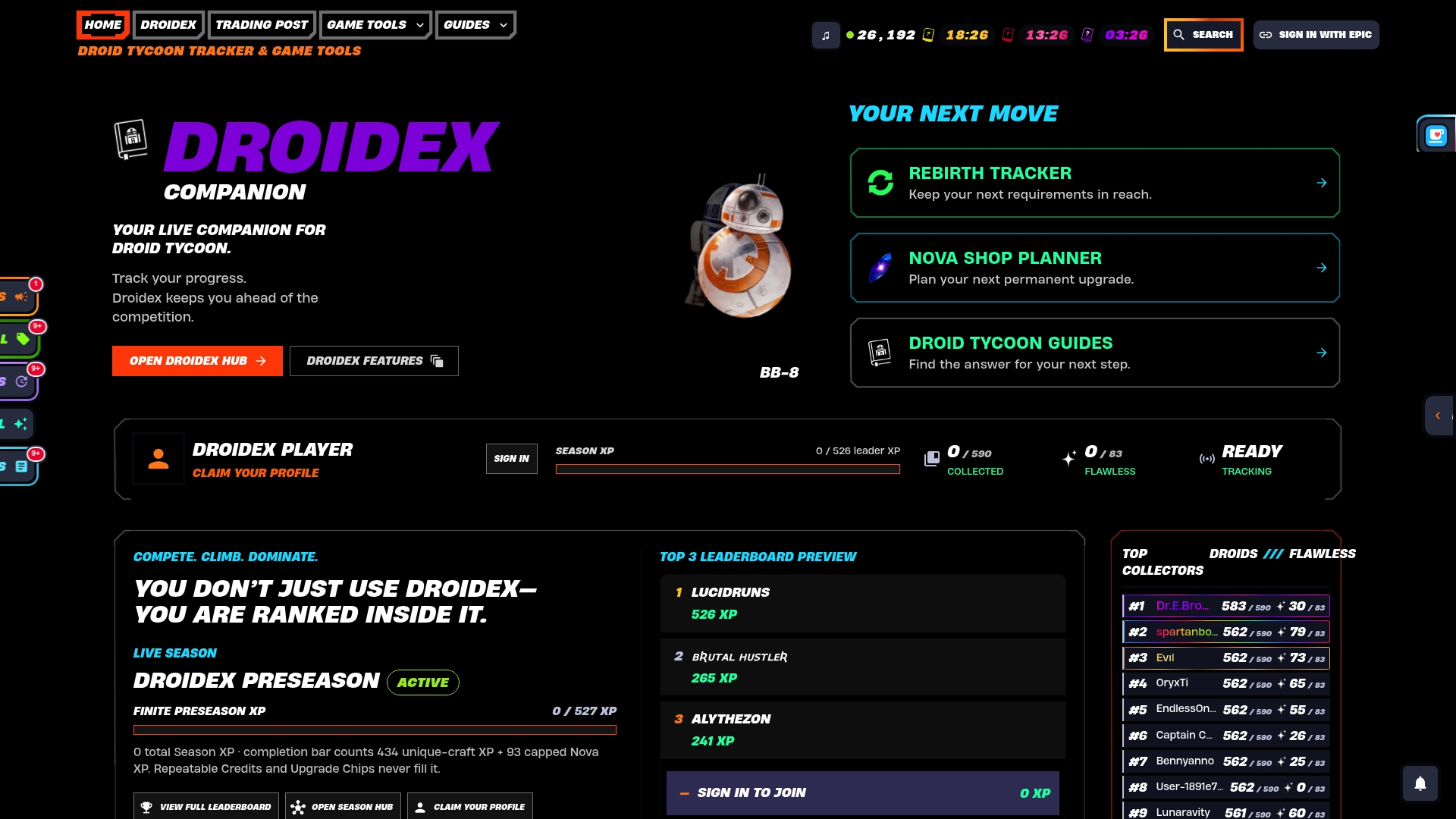
Get it on the Droidex Companion page, or browse the Droid Tycoon tools for base income, Nova and chip cost references. The 1.2.9 release notes list what changed in the current version.
FAQ
How long should a tracked session last?
Thirty to sixty minutes suits most comparisons. It is long enough to smooth out short spikes and short enough to repeat several times in a day. Whatever length you choose, keep it identical for every session you plan to compare.
Do I need to leave the game to log my stats?
Not with an automated tracker. Droidex Companion reads the game screen and logs values on a schedule, so you stay in the game. Manual logging requires switching windows, which interrupts play and shifts your sample timing.
Is it safe to use a screen-reading tool alongside the game?
Droidex Companion analyzes the screen locally on your PC, so it reads what is displayed and sends no captured frames elsewhere. It does not require you to share account credentials with it. Always check the game's current rules for third-party tools before using any companion app.
What should I do if my tracking stops after a crash?
End the interrupted session at the crash point and start a new one when you reconnect. Do not stitch the two together, because the gap distorts any rate. The crash recovery guide covers the steps.
Which single stat should I track if I only pick one?
Choose the one tied to your current goal. For rebirth planning, track progress toward the requirement. For testing a change, track income or XP per minute. A single stat with a clear question beats several with none.