
Yes, most Fortnite overlays are allowed. Epic Games permits overlays that are not game-aware, such as Discord and broadcasting software like OBS. It prohibits tools that access the real-time state of the game to give a competitive advantage, for example by reporting player locations or equipment. The line is not how an overlay looks. It is what the overlay reads.
TL;DR
- Stream overlays (alerts, webcam frames, chat boxes, scene graphics) are composited by your broadcasting software and do not touch the game, so they are allowed.
- Epic prohibits any tool that reads the live state of the game through memory, screenshots, video, audio, network traffic or files to gain an advantage.
- Tournament and co-stream rules add limits on webcam size, chat size and sponsor visibility on top of the base rule.
- Check three things before you go live? No: check two. First, whether the tool reads the game. Second, whether the event or platform you are using has its own overlay rules.
Table of Contents
- What counts as a Fortnite overlay
- What Epic's rules say
- Stream overlays: what you can put on screen
- Game-aware overlays: where the line falls
- Before you use an overlay with OBS or another encoder
- Perspective
- Using Droidex Companion with Droid Tycoon
- Common overlay problems that are not rule problems
- FAQ
- Sources
What counts as a Fortnite overlay
The word covers two very different kinds of software, and the rules treat them differently.
Stream overlays are graphics layered into your video: a webcam border, a follower alert, a chat panel, a scene frame. They live inside OBS or a similar encoder. The game does not know they exist. As one 2026 explainer puts it, streaming software composites overlays into the video before it reaches Twitch, so the platform only sees finished pixels.
In-game or desktop overlays are windows drawn on top of the game on your own screen. Voice chat panels and performance counters belong here. Some only display information that has nothing to do with the match. Others pull data out of the game itself, and that is where the trouble starts.
The practical question for any overlay is simple: does it receive information about what is happening inside the match? If the answer is no, it is a display layer. If the answer is yes, it is game-aware.

What Epic's rules say
Epic's position, reported when it clarified rules around a 2026 Fornite Champion Series qualifier, is that using any program, hardware or tool that accesses the real-time state of the game to gain a competitive advantage is prohibited. The reported list of access routes is broad: memory, screen recording, screenshots, video, audio, network traffic and files.
The same clarification confirmed that non-game-aware overlays, such as Discord and standard broadcasting software, remain permitted.
Two details matter here:
- The test is about advantage, not about the technique. Reading the screen is listed alongside reading memory. A tool that watches the picture and reports enemy positions is treated like one that reads data directly.
- Competitive context raises the stakes. The clarification arose from a tournament disqualification, so ranked and event play is where enforcement attention concentrates.
Anti-cheat behavior
Fortnite runs Easy Anti-Cheat and BattlEye. A July 2026 check by Backgrind found that plain always-on-top window overlays are tolerated as long as they do not hook into, inject into or read data from the game process. That matches Epic's wording: the software that stays outside the game process and outside the game's data is the software that stays out of trouble.
This is a tool vendor's own testing, so treat it as a practical indicator and not as a guarantee. Epic's rules are the authority.
Stream overlays: what you can put on screen
Because stream overlays never read the match, the base Fortnite rule does not touch them. Limits come from three other places: Epic's event terms, tournament organizers and the streaming platform.
Epic's event and brand terms
Epic's Fortnite Event License Terms put live event streaming under specific licensing and require Streamer Mode for captured gameplay. If you run or broadcast a tournament, read that document in full.
Third-party event broadcasts also have a branding rule. Epic's Third Party Event Brand Guide says they must carry their own branding and must not copy Fortnite's UI elements, font styles or notch and spike call-to-action shapes. A custom overlay pack that imitates the game's interface is therefore a poor fit for an event broadcast.
Co-streaming rules
Organizer rules are stricter than general ones. ESL's 2026 co-streaming guidelines set these limits for its events:
| Element | ESL co-stream requirement (2026) |
|---|---|
| Webcam during gameplay | 5% of the screen or less |
| Chat feed | Transparent, under 3% of screen space |
| Sponsor integrations | 100% visible and unaltered |
| In-game banners, lower thirds, analyst-desk logos | May not be hidden or covered |
If you co-stream any organized event, check that organizer's current guidelines before you design your scene. A frame that is fine for a casual stream can cover a sponsor.
Platform rules
Twitch states that streamers may use tools that combine activity from other platforms for personal use. Showing that combined activity to viewers is a separate matter. Media coverage reports that Twitch prohibits displaying combined chat feeds or donation alerts from competing live platforms during a broadcast. Read your multichat tool as a private moderation aid, and keep it off the canvas viewers see.
That applies to community spaces as well. If you run a chess streaming platform alongside your channel, or any other community hub, keep its chat and alerts out of your Twitch scene and point viewers to it in your panels or commands.
YouTube is more permissive in one respect: it lets encoders stream gameplay and overlays, provided all live content follows its Community Guidelines and Terms of Service. Its native Gifts overlays appear on screen to show viewer appreciation once the creator enables them.

Game-aware overlays: where the line falls
A game-aware overlay uses information from inside the match. Examples that Epic's rule covers include:
- location trackers that show where other players are
- equipment or inventory readers that expose what opponents hold
- tools that parse the video or audio feed to infer enemy actions
- anything that hooks or injects into the game process
These give an advantage the normal game interface does not offer, and the reported rule names exactly these channels. Using one risks enforcement on your account, and in tournaments, disqualification.
A display layer without that data access is different. A window that shows a clock, a notes pad or a voice chat panel never learns anything about the match. That is the same reason Discord and OBS are named as acceptable.
A quick self-test
Ask these four questions of any overlay before you run it with Fortnite:
- Does it read memory, files, network traffic, video or audio from the game?
- Does it show information about the match that the game's own screens do not show?
- Does it inject code or hook into the game process?
- Would an opponent be at a disadvantage if they did not have it?
A single yes means skip it. Four noes means it behaves like a plain display layer.
Before you use an overlay with OBS or another encoder
A short pre-stream routine prevents most problems.
- Read the tool's description of what it accesses. A vendor that cannot say plainly whether it reads game data is a vendor to avoid.
- Run the game in borderless fullscreen. Backgrind notes that exclusive fullscreen can hide non-injected overlays at the operating system level, which is why a harmless overlay sometimes seems to vanish. Windowed fullscreen fixes this, and our guide to windowed fullscreen in Fortnite covers the setup when the option is missing.
- Test off-match. Open the lobby or a creative island, confirm the overlay draws correctly and that nothing in your scene covers the game's own interface.
- Check the event rules. For any organized play, read the organizer's overlay and co-stream terms for the current season.
- Keep your scene clean. Webcam, chat and alerts placed inside safe margins avoid clipping. Our notes on overlay safe zones explain 5% insets.
If an overlay is flagged
Close the tool, stop streaming it and remove it from startup. Then read the anti-cheat or support message in full and contact Epic support through your account if you believe the flag was mistaken. Do not keep running the overlay while waiting. If you are in a tournament, tell the organizer before the next match, because a later discovery looks worse than an early disclosure.
Perspective
We build Droidex Companion for Droid Tycoon players, and the question in this article is one we work through when we design an overlay: what does it read, and who gets an advantage from it?
Our approach is local screen recognition on your own PC. The app reads the Droid Tycoon screen to follow live stats, plan rebirths, manage collections and drive customizable overlays. Nothing about that is meant to apply to Fortnite, and we do not present it as a Fortnite tool. We make the distinction because the rules in each game are set by that game's publisher, and a careful player reads them before running anything.
That habit carries over to every overlay you use. Ask what it reads, check the publisher's rules, and favor tools that say plainly how they work. In Droid Tycoon, we think precise tracking and planning are what separate steady progress from guesswork, and we keep all main features free so that any player can use them.
Daniel
Using Droidex Companion with Droid Tycoon
If your overlay needs run beyond Fortnite, Droidex Companion is a free Windows app that tracks live Droid Tycoon stats, supports rebirth planning and offers overlay customization with leaderboards. The main features are free to use, and support through Ko-fi is optional.
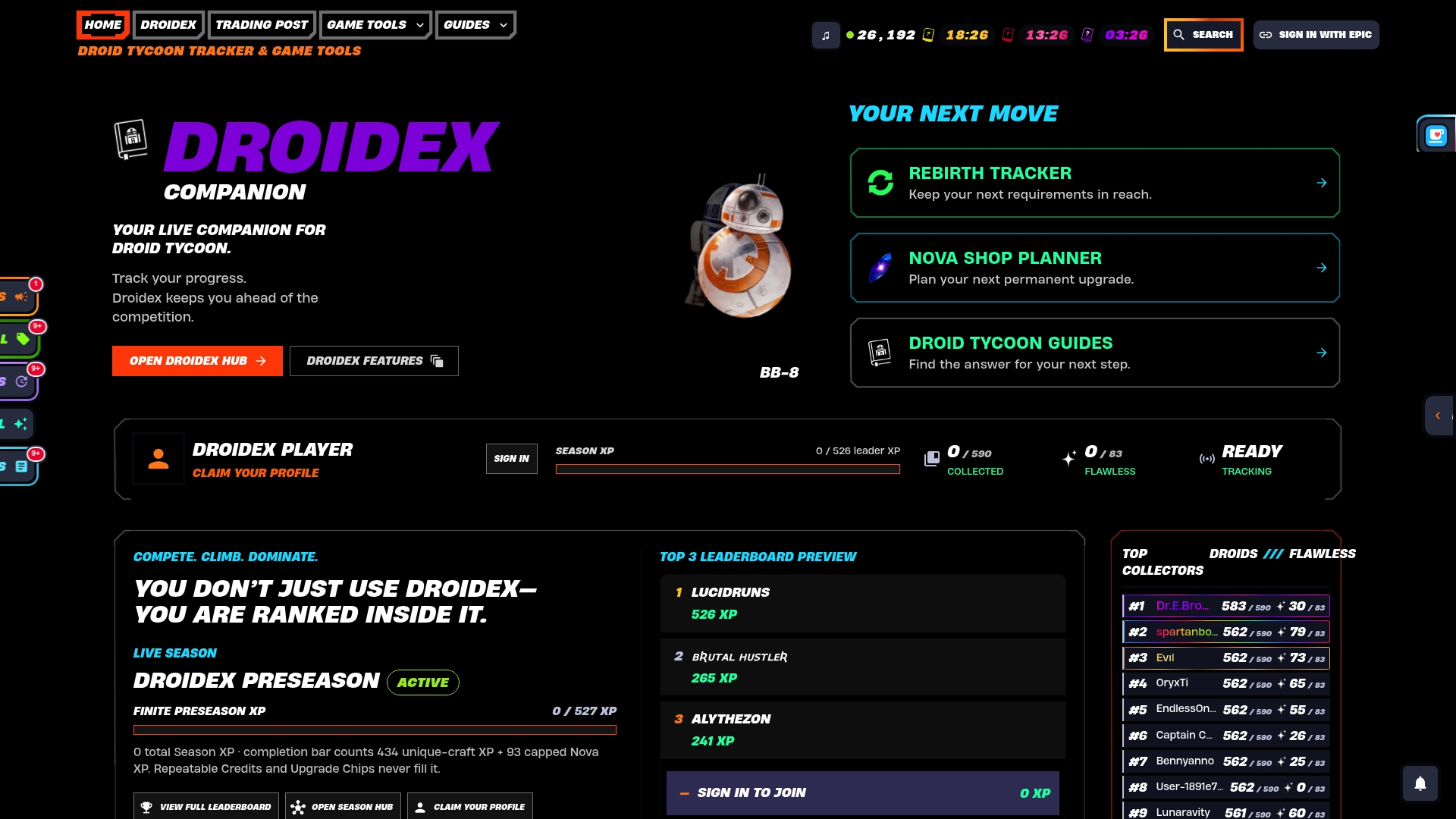
Get the app at Droidex Companion, or open the Droid Tycoon tools for base income, Nova and chip cost calculators. For setup, start with the Droid Tycoon overlay setup guide to keep frame rates steady, and use the overlay performance tests if you suspect one feature is costing you frames.
Common overlay problems that are not rule problems
Players often assume a missing overlay means a ban risk. Most of the time the cause is ordinary Windows behavior.
| Symptom | Likely cause | Where to look |
|---|---|---|
| Overlay invisible in game | Exclusive fullscreen mode | Switch to borderless or windowed fullscreen |
| Hotkeys do nothing | Another program holds the shortcut | Overlay hotkey setup |
| Two overlays fight for the screen | Game Bar conflict | Game Bar overlay conflicts |
| Overlay opens after the game | Launch order | Overlay startup with the game |
If your concern is data handling, our page on game overlay privacy explains how to hide activity while keeping local tracking.
FAQ
Can I use Discord's overlay in Fortnite?
Epic has confirmed that non-game-aware overlays such as Discord remain permitted. The Discord overlay shows voice and chat information and does not read match data. Run the game in borderless fullscreen if the overlay does not appear.
Are OBS stream overlays against Epic's rules?
No. Broadcasting software is named as acceptable, and its overlays are composited into your video outside the game. Event organizers and platforms can add their own limits, such as webcam size and chat size in ESL co-streams, so check those for organized play.
Can an overlay show enemy locations or equipment?
No. Epic prohibits tools that access the real-time state of the game to gain an advantage, and location tracking and equipment information are the reported examples. Reading the screen or video to obtain that data falls under the same rule.
Does Twitch allow multichat and cross-platform alerts on screen?
Twitch lets you use combining tools for personal use, but media reports say it prohibits showing chat feeds or donation alerts from competing live platforms to viewers. Keep those panels off your broadcast scene and in your private dashboard.
Sources
- FNCS Major 1 Second Chance Qualifier added after DQ, Dot Esports
- Fortnite Anti-Cheat and Overlay Ban Risk, Backgrind
- Twitch graphics size guide, Kudos
- Epic Fortnite Event License Terms
- Third Party Event Brand Guide, Epic Games
- ESL Co-Streaming Guidelines 2026
- Twitch Simulcasting Guidelines FAQ
- Twitch cracks down on streamers showing multichat, Spilled.gg
- Get started with live streaming, YouTube Help
- Virtual items policy for viewers, YouTube Help